

Debouncing vs Throttling
I'm a recent graduate with a degree in Mechanical Engineering but I have a passion for web development. I have hands on in ReactJS and I have experience building responsive, user-friendly web applications using this framework. I gained hands-on experience in web development through several projects . I'm proficient in HTML, CSS, JavaScript, and I have experience working with various front-end technologies such as ReactJS, Redux, and Bootstrap. I'm also familiar with back-end development such as Node.js and Express.js.
In this article, we will learn about debouncing and throttling when to use and when to use them.
Both of these techniques are used to improve the performance optimization of web pages.
let's Take an example using a general approach
General Approach
<!DOCTYPE html>
<html lang="en">

<head>
    <meta charset="UTF-8">
    <meta name="viewport" content="width=device-width, initial-scale=1.0">
    <title>Document</title>
    <link rel="stylesheet" href="style.css">
</head>

<body>
    <input type="text" name="search" id="search" placeholder="Search">
    <script src="index.js" type="text/javascript"></script>
</body>
</html>
//Case 1 : genral approach
let textField = document.querySelector('#search');
let count=0
textField.addEventListener('input', (event) => {
console.log(`fires times: ${count++} value:  ${event.target.value}`)
})
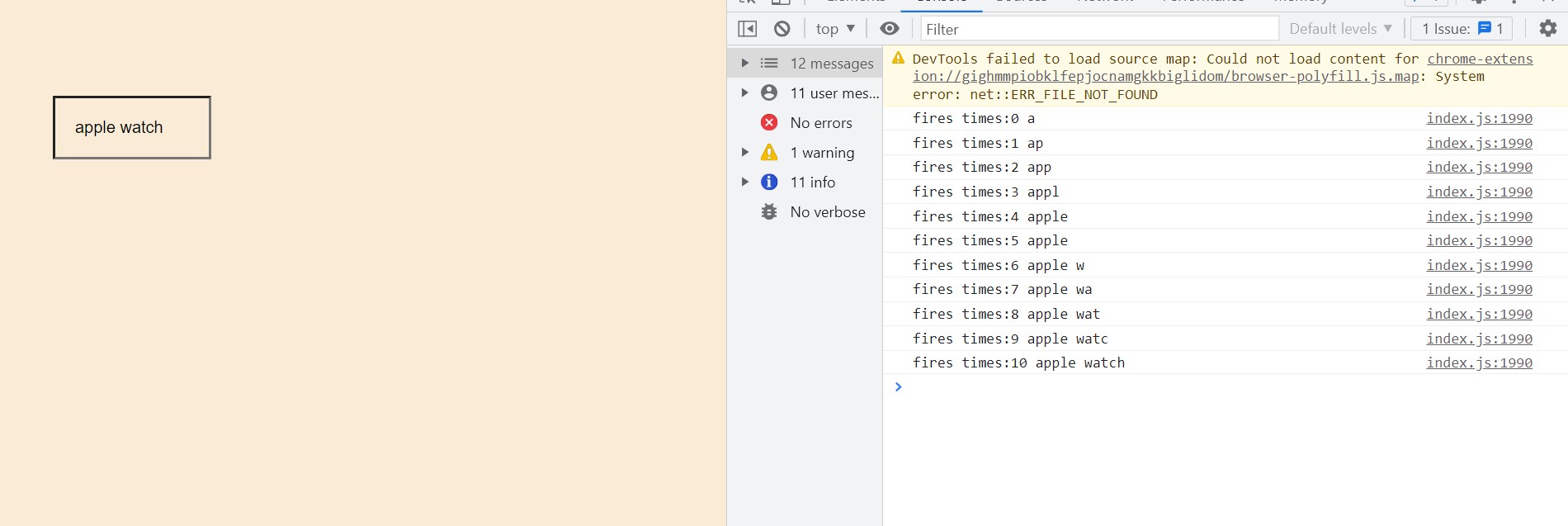
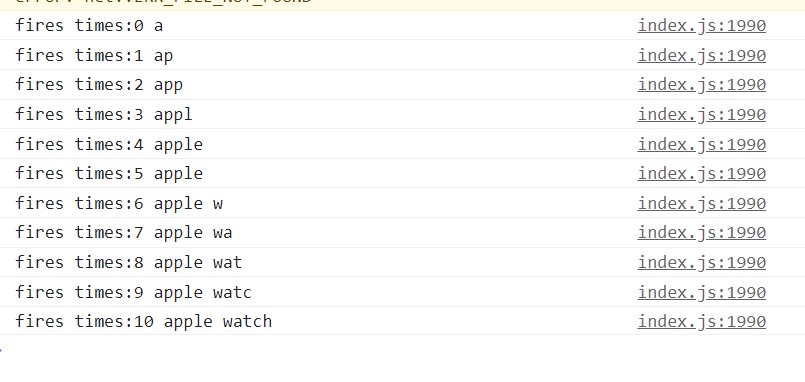
In the above example, we will attach a listener to the keypress event. Every time you enter any keyword it calls a function.
The above technique is not optimal and leads to unnecessary function calls that stall the performance of the web page.
Let's explain with respect to the ecommerce website where we are searching for a desired item.
Suppose the user tries to search for an "apple watch" now each when user will press "a" then this fetch request will be triggered and it will return all the data that have "a" in it then the user will press "p" so now again this fetch API call will be triggered and it will return all the results will which has "ap" in it and this way this API will be triggered each time when the user is pressing any key so for "apple watch" it will be called 10 times.
Now the arises how can we reduce the number of times this fetch API
called. To solve this problem there are two technique that are debouncing & throttling.
To optimize it further we will use debouncing & throttling.
Now let's explore them one by one:
Debouncing Technique
In the debouncing technique, no matter how many times the user fires the event, the attached function will be executed only after the specified time once the user stops firing the event.
Let's change our code
const debounce = (func, delay) => {
  let timerId;
  return function (...args) {
      clearTimeout(timerId)
      timerId = setTimeout(() => func(...args), delay)
  };
};
let count=0;
let handleInput= debounce((event) => {
  console.log(`fires times:${count++} ${event.target.value}`)
},1000)


let textField = document.querySelector('#search');
textField.addEventListener('input', handleInput);
The debounce() function forces a function to wait a certain amount of time before running again. The function is built to limit the number of times a function is called.
In this case, we wait for the user to stop typing for a few seconds before calling our function. thus, on every keystroke, we wait for some seconds before giving a response.
How it works:
The
debouncefunction takes two parameters:func(the function to be debounced) anddelay(the duration of inactivity required before executing the function).Inside the
debouncefunction, atimerIdvariable is declared to keep track of the setTimeout timer.The returned function is a closure that wraps the original function
func.Whenever the returned function is called (in this case, when the 'input' event is triggered), it clears the previous setTimeout timer using
clearTimeout.It then sets a new setTimeout timer, which delays the execution of
funcby the specifieddelay.The
funcis executed inside the setTimeout callback, passing any provided arguments using the spread operator...args.This ensures that
funcis only executed after the specifieddelayof inactivity.
the handleInput function is the debounced function that will be executed when the 'input' event is triggered on the textField element. The console.log statement inside handleInput will display the number of times the event is fired and the value of the input field.
By debouncing the input event, the handleInput function will only be executed after a 1 second period of inactivity, effectively reducing the number of function calls and improving performance, especially in scenarios where the user is typing rapidly.
Throttling Technique
Throttling is a technique used to limit the rate at which a function is executed. It ensures that the function is called at a regular interval, regardless no matter how many times the user fires the event.
Let's change our code
//Case 3: With Throttling
const throttle = (func, delay) => {
    let toThrottle = false;
    return function (...args) {
        if (!toThrottle) {
            toThrottle = true;
            func(...args)
            setTimeout(() => {
                toThrottle = false
            }, delay);
        }
    };
};

let count=0;
let handleInput= throttle((event) => {
  console.log(`fires times:${count++} ${event.target.value}`)
},1000)


let textField = document.querySelector('#search');
textField.addEventListener('input', handleInput);
Throttling is used to call a function after every millisecond or a particular interval of time only the first click is executed immediately.
throttle function takes an existing expensive function & delay limit and returns a better expensive function which is called only after a certain delay limit.
How it works:
The throttle function takes two parameters:
func(the function to be throttled) anddelay(the minimum time between function calls).Inside the throttle function, a
toThrottleflag is declared and set tofalse. This flag keeps track of whether the function is currently being throttled.The throttle function returns a new function, which is the throttled version of the original function. This function is a closure that has access to the
toThrottleflag and the parameters passed to the throttled function.When the throttled function is called, it first checks the
toThrottleflag. If it'sfalse, indicating that the function is not currently being throttled, it proceeds with the execution.Inside the if statement,
toThrottleis set totrue, indicating that the function is now being throttled.The original
funcis executed with the provided arguments using the spread operator...args.After executing
func, a setTimeout timer is set with a duration equal to the specifieddelay.Inside the setTimeout callback, the
toThrottleflag is set back tofalse, allowing the function to be executed again.
the throttled handleInput function is attached as an event listener to the input event of a text field (#search). Each time the event is triggered, the function is called at most once every 1000 milliseconds (1 second), effectively throttling the input event handling.


